• Home
  • Getting Started
  • ICTO Home
  • UM Home
logo
  • Home
  • Getting Started
  • ICTO Home
  • UM Home
You are here: /Mobile Applications / UM eMap /
ICTO - FAQ » Mobile Applications » UM eMap » How to get location URL on UM eMap?

How to get location URL on UM eMap?

  • Published on: August 14, 2015   Last updated on: June 5, 2025
  • Mobile Applications/ UM eMap
  • A A A

Print


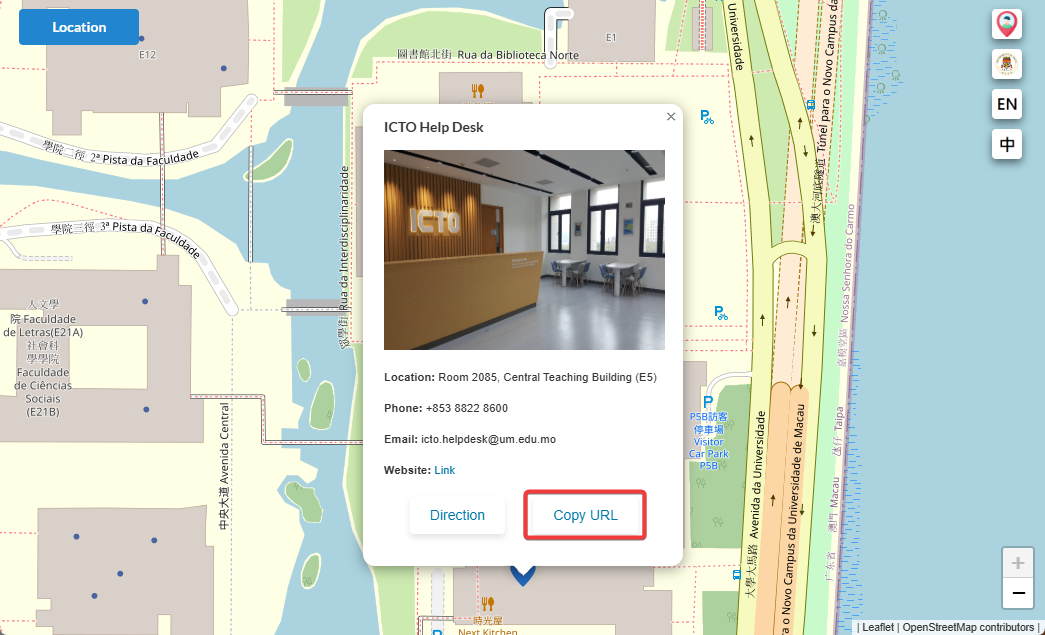
  1. Click the point of interest (POI) on eMap in web browser
  2. Click the “Copy URL” in the information box
Tagged:Location URLMobile TechnologyUM eMap

Related Articles

  • How to request to update the information on UM eMap?

  • How to see your current location on UM eMap?

Popular Articles

  • How to apply UM@Connect?
  • In Outlook 2013, how do I exclude certain emails from auto replies in the Out of Office Assistant?
  • What can I do if I forgot my user account password?
  • Can I copy the Lotus Notes document links to the email in Outlook?

Latest Articles

  • How to connect VPN to access UM App intranet service?
  • I am a PG student, how can I make payment for PGH miscellaneous fees?
  • Enquiry / Report Problem / Help Desk Contact for Support
  • How to use interpretation feature in VooV/Tencent Meeting?

Tag Cloud

Outlook staff email softphone jabber UM@Connect UMPASS SPAM Outlook 2013 HPCC Secure Email Gateway WebCMS User Digest Quarantine Office 2013 IP Phone Printing 打印 UMMoodle Computer Room Wireless Network Service Network 2FA Email Alias 垃圾電郵 安全電郵網關 隔離 PowerPoint 2013 雙重認證服務 Two-Factor Authentication eduroam WebCMS getting started Job OOD UMDrive Open OnDemand Web-based win11 GUI
Copyright © 2021 ICTO, University of Macau. All rights reserved.